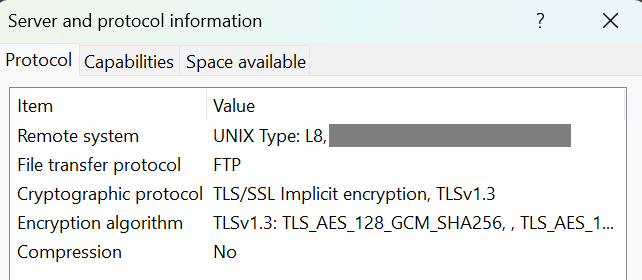
When you run an FTP server in 2025, like a surviving dinosaur, and you have the presence of mind to add a TLS layer, you may find yourself puzzled by the lack of support for certificate renewal in commercial FTP server software. The idea of reverse proxying the FTP server makes sense, but FTP likes to cross protocol layer boundaries, making things complicated. Here is how to reverse proxy FTP with TLS using OpenResty (e.g., as used in Nginx Proxy Manager).
FTP is TLS-aware
A typical modern FTP over implicit TLS connection starts with an exchange like this one:
[11:55:02] [R] Connecting to x.y.z.a -> IP=x.y.z.a PORT=21
[11:55:04] [R] Connected to x.y.z.a
[11:55:04] [R] TLSv1.2 negotiation successful...
[11:55:04] [R] TLSv1.2 encrypted session using cipher ECDHE-ECDSA-AES256-GCM-SHA384 (256 bits)
[11:55:04] [R] 220 [whatever FTP software name] ready...
[11:55:04] [R] PBSZ 0
[11:55:04] [R] 200 Command PBSZ okay.
[11:55:04] [R] USER your_username
[11:55:04] [R] 331 User name okay, need password.
[11:55:04] [R] PASS (hidden)
[11:55:05] [R] 230 User logged in, proceed.
[11:55:05] [R] SYST
[11:55:05] [R] 215 UNIX Type: L8
[11:55:05] [R] FEAT
[11:55:05] [R] 211-Extensions supported
...
[11:55:05] [R]  PBSZ
[11:55:05] [R]  PROT
...
[11:55:05] [R] 211 End
[11:55:05] [R] PWD
[11:55:05] [R] 257 "/" is current directory.
[11:55:05] [R] PROT P
[11:55:05] [R] 200 Command PROT okay.
[11:55:05] [R] PASV
[11:55:05] [R] 227 Entering Passive Mode (x,y,z,a,41,5)
[11:55:05] [R] Opening data connection IP: x,y,z,a PORT: 10501
[11:55:06] [R] MLSD
[11:55:06] [R] TLSv1.2 negotiation successful...
[11:55:06] [R] TLSv1.2 encrypted session using cipher ECDHE-ECDSA-AES256-GCM-SHA384 (256 bits)
[11:55:06] [R] 150 Opening BINARY mode data connection for MLSD.
[11:55:06] [R] 226 Transfer complete. 875 bytes transferred. 56.97 KB/sec.
[11:55:06] [R] List Complete: 843 bytes in 2 seconds (0.5 KB/s)
Several things happen here. The FTP client starts a TLS connection with the server on the main port 21. Of interest to us, the client issues the PBSZ 0 command to set the protection buffer size. All FTP clients I use set it to 0. Next, the client sends a PROT P command, informing the server that all control + data channels must be encrypted.
This PROT (Data Channel Protection Level) command is important, because every time you list a directory or transfer a file, you must establish a new connection to the FTP server over a data port (if you use the “passive mode”, as everyone does). Whether this new connection must be TLS-encrypted or not is a relevant question.
PROT has 4 options:
- C – Clear: Plaintext data connection (big no!)
- S – Safe: “data will be integrity protected”
- E – Confidential: “data will be confidentiality protected”
- P – Private: “data will be integrity and confidentiality protected”
The RFC says: “The default protection level if no other level is specified is Clear.”
If you take TLS off your FTP server, making it operate as simple plaintext FTP, and add/remove TLS at a reverse proxy, your FTP server has no idea that TLS is involved. Therefore, when a TLS client connects over TLS to the FTP server via the reverse proxy, it first sends the PBSZ 0 command, and your FTP server will be like WTF DUDE this is a plaintext connection! Indeed, as per RFC 2228, “The PBSZ command must be preceded by a successful security data exchange.”
Practically, this looks like the following:
[12:06:08] [R] PBSZ 0
[12:06:09] [R] 503 Secure command connection required prior to PBSZ command.
In response, the client gets confused, and this is where things get nasty.
FTP clients will react differently to this error. FlashFXP, my once favorite FTP/FXP client, unmaintained for years due to its author being jailed, ignores this problem and continues as if nothing happened. It later issues a PROT P command that receives the same treatment:
[12:06:10] [R] PROT P
[12:06:10] [R] 503 Secure command connection required prior to PROT command.
FlashFXP still ignores this error and pretends the server understood the client intends to use the data channel as a Protected channel. It then establishes a TLS connection to the data port for whatever operation (listing directory or transferring files). And this will work, given that TLS is supported by the reverse proxy and everything will correctly appear as plaintext to the FTP server!
Unfortunately, this behavior is not standard. WinSCP and FileZilla do it differently. They default to PROT C, as the RFC specifies. That means they establish a TCP connection to the data port, but instead of sending a TLS Client Hello, they either send data directly or wait for data to be received. Since the FTP client first lists the current directory, it expects the listing to come from the server, while the reverse proxy expects a Client Hello. This exchange will timeout.
Protocol-aware proxying with Lua
To effectively deceive the FTP client that the PBSZ and PROT commands were received successfully, without letting the FTP server disclose that its view of the connection is just plaintext, we need to reverse proxy to intercept these two commands and respond on behalf of the FTP server.
With vanilla nginx, this is not possible. But with OpenResty, that supports more advanced tasks written in Lua, this gets possible.
This FTP and TLS interaction issue was already encountered in the commercial firewall world a while ago. This post on the F5 community website shares a code, presumably for F5 appliances, that deals with our problem: https://community.f5.com/kb/codeshare/ftps-ssl-termination/274110
As I had no experience with doing Lua in OpenResty, I asked Grok to translate this F5 code into a Lua script for OpenResty. After a few iterations to fix bugs, it came up with the following solution. Instead of using proxy_pass to proxy the connection directly back to the FTP server, simply copy the following script.
content_by_lua_block {
    local downstream = ngx.req.socket()  -- Client socket (post-TLS)
    if not downstream then
        ngx.log(ngx.ERR, "Failed to get downstream socket")
        return ngx.exit(ngx.ERROR)
    end

    local upstream = ngx.socket.tcp()
    local ok, err = upstream:connect("x.y.z.a", 21)  -- Update to the actual FTP server IP address
    if not ok then
        ngx.log(ngx.ERR, "Failed to connect to backend: ", err)
        return ngx.exit(ngx.ERROR)
    end

    downstream:settimeout(30000)  -- 30s timeout
    upstream:settimeout(30000)

    -- Client to server
    local function client_to_server()
        while true do
            local line, err = downstream:receive("*l")  -- Read line without \r\n
            if err then
                if err ~= "closed" then
                    ngx.log(ngx.ERR, "Downstream read error: ", err)
                end
                return
            end

            local response
            if line and string.match(line:upper(), "^PBSZ%s+0$") then
                response = "200 Command PBSZ okay.\r\n"
            elseif line and string.match(line:upper(), "^PROT%s+([PCSE])$") then
                local prot_type = string.match(line, "^PROT%s+([PCSE])$")
                if prot_type == "P" then
                    response = "200 Command PROT okay.\r\n"
                elseif prot_type == "C" then
                    response = "534 Insufficient data protection.\r\n"
                elseif prot_type == "S" or prot_type == "E" then
                    response = "504 Command not implemented for that parameter.\r\n"
                end
            end

            if response then
                downstream:send(response)
            else
                upstream:send(line .. "\r\n")
            end
        end
    end

    -- Server to client
    local function server_to_client()
        while true do
            local line, err = upstream:receive("*l")
            if err then
                if err ~= "closed" then
                    ngx.log(ngx.ERR, "Upstream read error: ", err)
                end
                return
            end
            downstream:send(line .. "\r\n")
        end
    end

    ngx.log(ngx.INFO, "Starting FTPS proxy session")
    ngx.thread.spawn(client_to_server)
    server_to_client()
}
This script parses line by line the commands sent on the control port, detects the problematic commands, and responds to them. It forwards and proxies back any responses. The “PBSZ 0” command is labeled as “Essentially a no-op” in the F5 post, so nothing is done to process this command, and everything seems fine this way.
And it works! FTP clients get the responses they expect as if they connect directly to the FTP server over TLS, and the FTP server doesn’t know TLS is used at all.
NPM configuration
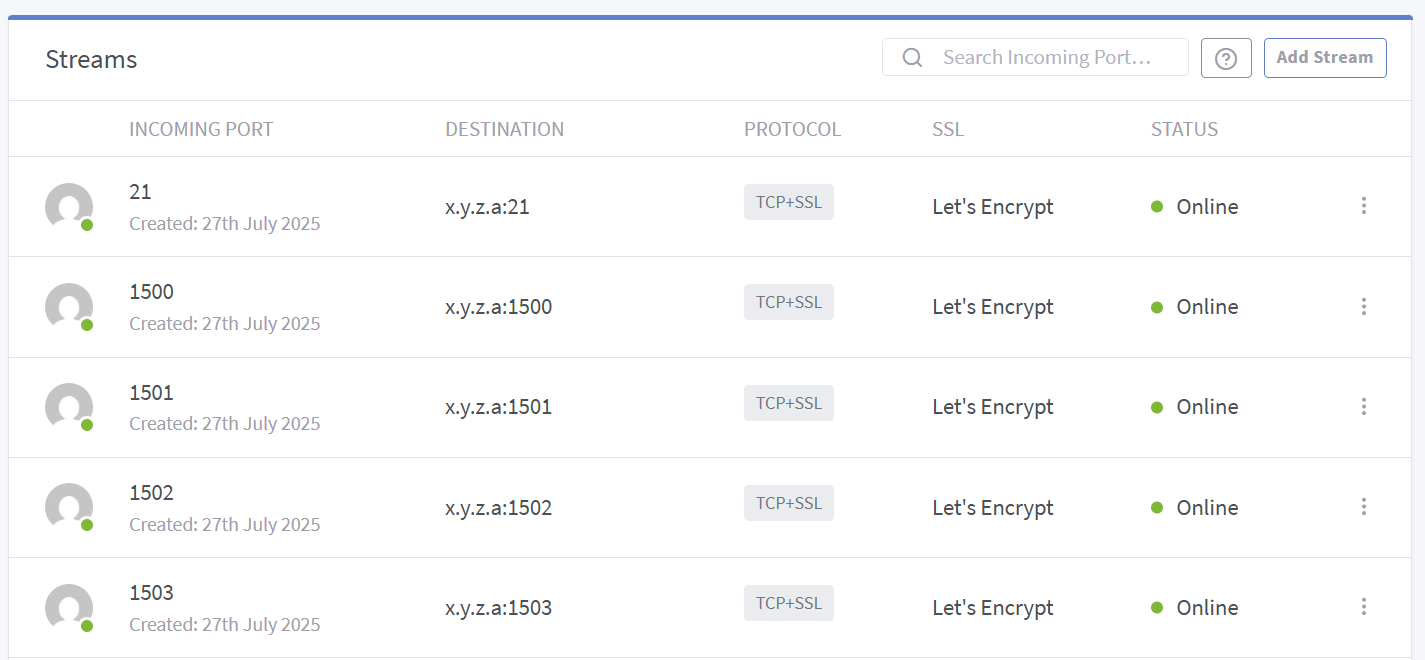
The overall configuration in Nginx Proxy Manager looks as follows:
There is one stream for the control channel (port 21), and one stream per data port (there is no way to set a range to forward at once, though an issue was made years ago on the GitHub project to request such a feature).
The actual OpenResty config file for the data channel is:
server {
listen 21 ssl;
listen [::]:21 ssl;

# Let's Encrypt SSL
include conf.d/include/ssl-cache-stream.conf;
include /data/custom_ssl/tls13-aes128.conf;
ssl_certificate /etc/letsencrypt/live/npm-25/fullchain.pem;
ssl_certificate_key /etc/letsencrypt/live/npm-25/privkey.pem;

content_by_lua_block {
  [...see code above...]
}

  # Custom
  include /data/nginx/custom/server_stream[.]conf;
  include /data/nginx/custom/server_stream_tcp[.]conf;
}
The other data channel ports config are simply:
server {
  listen 1500 ssl;
  listen [::]:1500 ssl;

  # Let's Encrypt SSL
  include conf.d/include/ssl-cache-stream.conf;
  include /data/custom_ssl/tls13-aes128.conf;
  ssl_certificate /etc/letsencrypt/live/npm-25/fullchain.pem;
  ssl_certificate_key /etc/letsencrypt/live/npm-25/privkey.pem;

  proxy_pass x.y.z.a:1500;

  # Custom
  include /data/nginx/custom/server_stream[.]conf;
  include /data/nginx/custom/server_stream_tcp[.]conf;
}
Note that I customized the TLS config. Normally, when using Let’s Encrypt, NPM includes its own TLS config in conf.d/include/ssl-ciphers.conf, but I don’t like it. I only want TLS 1.3 and I don’t care about TLS 1.2, so I include tls13-aes128.conf with the following content:
ssl_protocols TLSv1.3;
ssl_ciphers HIGH:!aNULL:!MD5;
ssl_conf_command Ciphersuites TLS_AES_128_GCM_SHA256:TLS_AES_256_GCM_SHA384:TLS_CHACHA20_POLY1305_SHA256;
ssl_prefer_server_ciphers on;
PS: I judge AES128 to be sufficient for my application, preferring it over AES256, but feel free to swap the ciphersuites in the config.
PS2: You may need to fight with the IP address given in response to the PASV (passive mode) command since you are now using a reverse proxy, but his is another story. Some clients ignore different IP addresses given here and connect to the same server IP address, while others honor the instruction, which could point to the wrong server.
Happy FTPS!
 Xavier de Carné