
The AMI firmware update tool seems to have a problem with its driver, preventing firmware updates at the moment. I will show here how to update the BIOS of a Samsung Galaxy Book Pro 360 using the Windows recovery environment that doesn’t blacklist the driver.
In Samsung Update, I noticed a BIOS update was available. I clicked on Install, followed the instructions, clicked OK. The laptop restarted, but nothing happened.

Exploration of the problem
If the tool cannot update the firmware, there is usually a way to make the BIOS load the image and update from it, or apply the image otherwise. After downloading the BIOS update executable (ITEM_20211012_22055_WIN_P02AKF.exe), I saw it was not a simple self-extractible executable that WinRAR could open. A dirty trick I played to extract all the files contained in it was to run it in Sandboxie, then as soon as I hit OK on the above prompt, run a command line to copy all files from %TEMP%\__Samsung_Update to a separate folder. After a few trials, I managed to get the files.

Technically, WFU_PAKF.inf seems to install a driver, which effectively copies the firmware image (P04KF.cap) to a strange location (C:\windows\Firmware\{922DBE27-1BF4-41C4-B111-3CF1E4005552}). Other commands were likely run by the updater to effectively update the firmware.
In the real %TEMP%\__Samsung_Update, the file DebugAppLog.txt contains some interesting details about the command to run to update the firmware:
One thing to notice is the AFUWINx64_s.EXE file. This is an AMI firmware updater, which can be downloaded separately from https://www.ami.com/bios-uefi-utilities/.
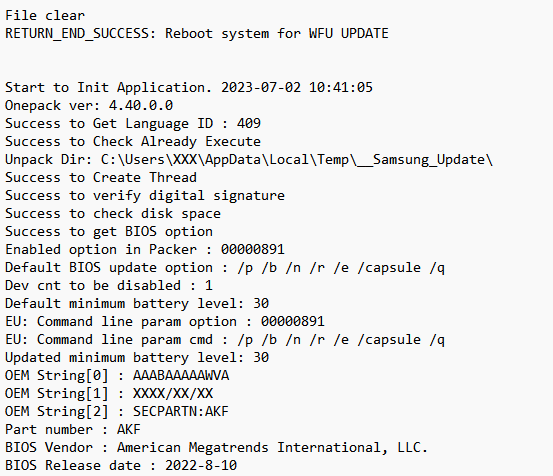
The parameters “/p /b /n /r /e /capsule /q” are intended for AFUWIN and will be useful in a moment. They indicate what part of the firmware to update, which part to preserve, etc.
I tried running as admin AFUWINx64_s.EXE P04AKF.cap /p /b /n /r /e /capsule /q, but I am getting a driver error.

Looking at the Event Viewer, I noticed a recent Error event that brought in some new information:
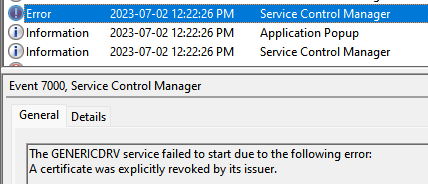
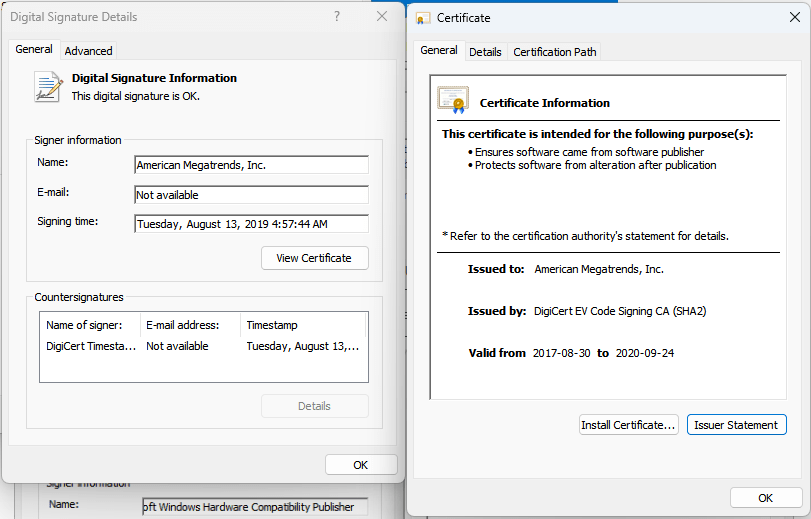
“A certificate was explicitly revoked by its issuer.” That’s a interesting problem. However, the driver file appears to be properly signed by AMI and countersigned by Microsoft, and none of the certificates involved appear to be revoked.

A bit of a search revealed that it might be a mechanism in Windows to block vulnerable drivers from loading.
Fair enough, an old AFUWIN is vulnerable, let’s download the latest one from AMI! Here is a direct link valid today: https://f.hubspotusercontent10.net/hubfs/9443417/Support/BIOS_Firmware_Update/Aptio_V_AMI_Firmware_Update_Utility.zip (you may want to click on “APTIO V AMI FIRMWARE UPDATE UTILITY” at https://www.ami.com/bios-uefi-utilities/ otherwise).
I extracted afu\afuwin\64\AfuWin64.zip and tried running AFUWINx64.exe P04AKF.cap /p /b /n /r /e /capsule /q but the command failed likewise, and the same error was found in the event logs…
This would mean Windows is preventing all firmware updaters from AMI from running at the moment. Hmm…
Solution
The solution would be quite simple. While disabling the Microsoft Vulnerable Driver Blocklist did not seem to make a difference, so after placing all the necessary files on my desktop, and noting down the recovery key for my Bitlocker-encrypted OS volume, I clicked on the start menu, then pressed Shift while clicking on Restart.
After a restart and a few menus later to access a command prompt (which prompts for the Bitlocker recovery key), it is possible to run the updater using the command above (AFUWINx64_s.EXE P04AKF.cap /p /b /n /r /e /capsule), which initiates a reboot and lets the firmware get updated!

Finally, the BIOS is updated:

Now, blame Samsung for not providing any details/changelog about firmware updates…
 Xavier de Carné
Hello Xavier!
I have the same problem on my Book2 Pro. I can fix minor problems, but I am not much of a tech savvy. Can you please explain the solution you mentioned a little bit more, perhaps step by step. Without a Bitlocker-encrypted OS volume.
Thanks,
LikeLike
You could try a shortcut method: Shift-Restart to access a command prompt, then navigate to the BIOS update executable and run it. If it can run in this environment, that’s it. I forgot whether I tried this option. Otherwise, you would need to extract the content of the executable (see how I did it, but not straightforward) and run the AFUWINx64_s.EXE command manually according to your DebugAppLog.txt.
LikeLike